EmojiSpark is a free emoji finder with 17,000+ copy-ready emojis, symbols, kaomoji, and curated combinations plus a Combo Studio for remixing.
Submit your website to get discovered by thousands of potential customers and boost your SEO.
Get ListedEmojiSpark is a free emoji finder and combination studio built for anyone who needs the right little character quickly. The site pulls thousands of emojis, text symbols, Japanese kaomoji, and ready made emoji combinations into a single searchable catalog, then pairs every result with a one tap copy button and a remix workflow for adapting a find into something personal. It addresses a narrow but constant problem: most emoji reference sites stop at a static grid of Unicode characters, while EmojiSpark organizes the same raw material into moods, feelings, and curated sets that read like complete messages. The platform suits social media posters, designers, streamers, copywriters, community managers, and casual users who assemble captions, bios, and status lines daily and want variety without digging through old message threads. Everything runs in the browser, no account is needed, and the interface is offered in English, Spanish, and French.
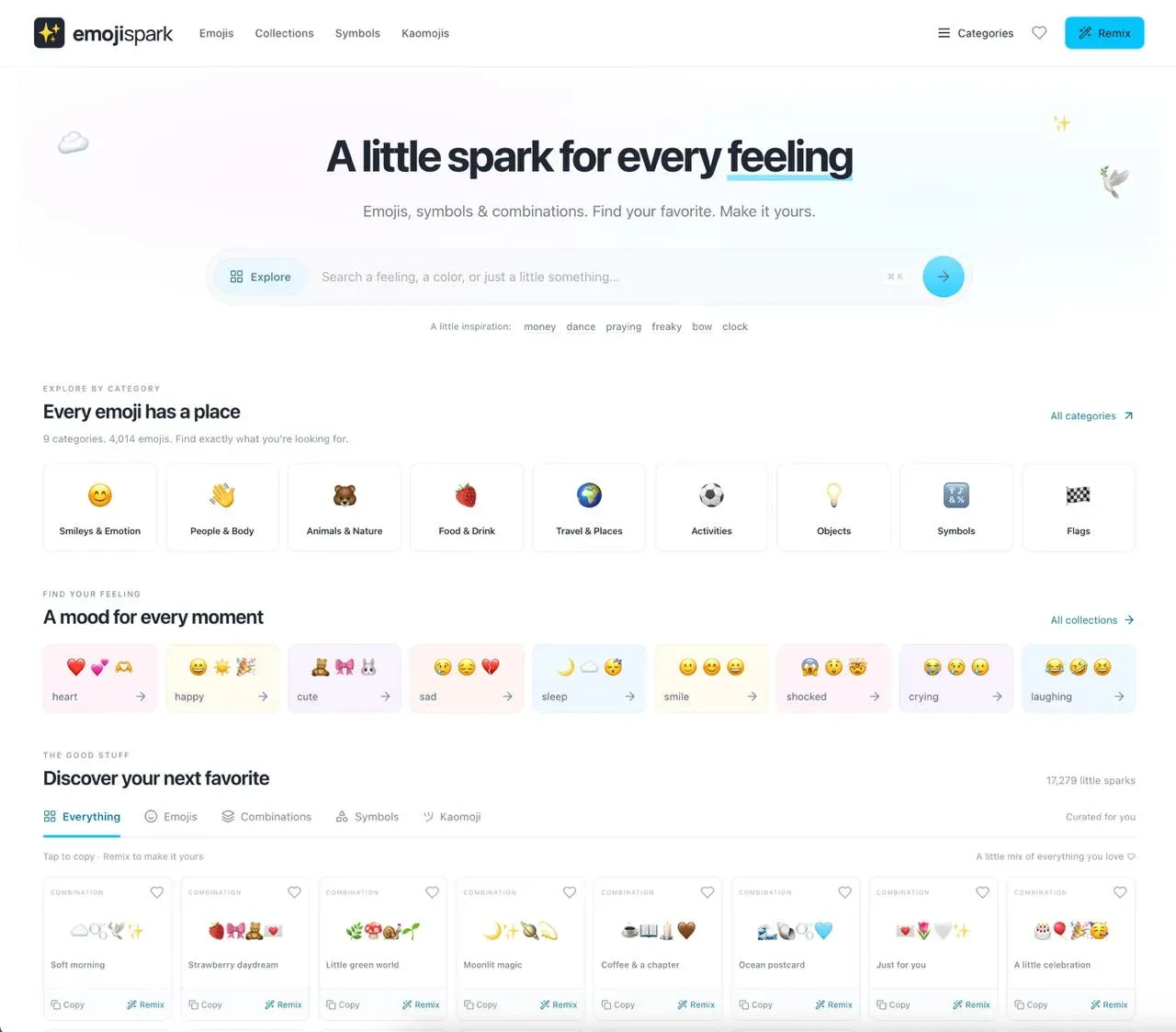
Unified catalog with content type tabs. A tab strip labeled Everything, Emojis, Combinations, Symbols, and Kaomoji filters one shared index of 17,279 entries. The current tally is displayed beside the section heading so visitors always know how large the pool is, and a live region announces changes when a tab is switched.
Category browser spanning nine emoji groups. The homepage surfaces Smileys and Emotion, People and Body, Animals and Nature, Food and Drink, Travel and Places, Activities, Objects, Symbols, and Flags with exact counts attached to each card, from 160 food entries to 1,923 people entries. Each card notes how many sub-filters exist, and a footnote clarifies that totals include skin tone and other variants.
Mood and feeling shortcuts. A horizontally scrolling row of tinted cards groups sets by sentiment: heart, happy, cute, sad, sleep, smile, shocked, crying, and laughing. Every card previews three representative characters, so a visitor scanning the strip can identify the right emotional register before clicking through.
One tap copy and a saved collection. Each card hides a copy action that writes the emoji or combination straight to the clipboard, with an inline confirmation state. A bookmark icon on the same card adds the item to a personal saved collection, which has its own page and a running counter in the sidebar.
Combo Studio and seed based remixing. The Remix link attached to every combination opens the generator with the source sequence pre-filled through a seed URL parameter. Inside the studio, users type into a large centered canvas, apply style presets, and pick characters from a visual palette, then review a grid of remixed variants with individual copy and regenerate controls.
Creative side tools. The Heart Sticker Maker renders a downloadable heart image through an HTML canvas, Heart Text Art produces a monospace ASCII heart ready for plain text spaces, and the Moon Phase Emoji page maps lunar states to their matching characters. These small utilities sit alongside the catalog rather than behind a paywall.
Reviewed community submissions. A share dialog labeled Share your spark accepts a combination capped at 100 characters, a display name between 2 and 80 characters, and a comma separated tag list. A character counter warns that some emoji consume more than one unit, and copy inside the modal states that every submission is reviewed before publication.
The platform requires no registration, so the typical journey starts on the homepage and stays frictionless. A visitor either types a feeling, a color, or a phrase into the rounded search field, presses the ⌘K shortcut to jump into it, or taps one of the inspiration chips such as money, dance, pray, bow, or clock that sit directly under the box. Category cards, mood cards, and the discovery grid provide three alternate entry points for people who prefer browsing to querying. Selecting any card copies the character to the clipboard immediately, while the bookmark icon stores it locally, and the Remix link hands the sequence off to the generator for editing. Submitting a custom combination closes the loop through the moderated review queue. Because everything is browser based and clipboard driven, there is nothing to install, and the three language options apply across the catalog and the tool pages.
A social media coordinator at a small consumer brand needs a fresh caption accent for a spring campaign and uses the mood cards to jump straight into a pink and pastel set, then copies a four character combination instead of building one from scratch.
A product designer assembling a playful onboarding microcopy deck browses the Symbols category and the Combo Studio palette to test decorative marks and arrows before committing to a visual direction.
A community manager moderating a Discord server opens the Kaomoji tab to find text based emotes that render consistently in plain text channels where color emoji styling varies by client.
A newsletter writer who needs a plain text flourish uses Heart Text Art to drop a monospace heart into an email footer that must survive strict formatting rules.
A creator building a lunar themed content calendar checks the Moon Phase Emoji page to attach the correct crescent or gibbous glyph to each scheduled post.
EmojiSpark targets individual creators, social media practitioners, designers, and small content teams that work in text heavy channels and need quick visual accents without a design tool. Technical skill requirements are essentially zero, and the audience skews toward people who already write captions, bios, chat messages, and microcopy daily. Compared with reference libraries such as Emojipedia, which emphasizes definitions and version history, or raw copy paste symbol sites, EmojiSpark leads with curated multi character combinations and a remix editor. It is a lighter fit than full design suites for anyone who simply wants the character, the copy action, and a way to make it personal.