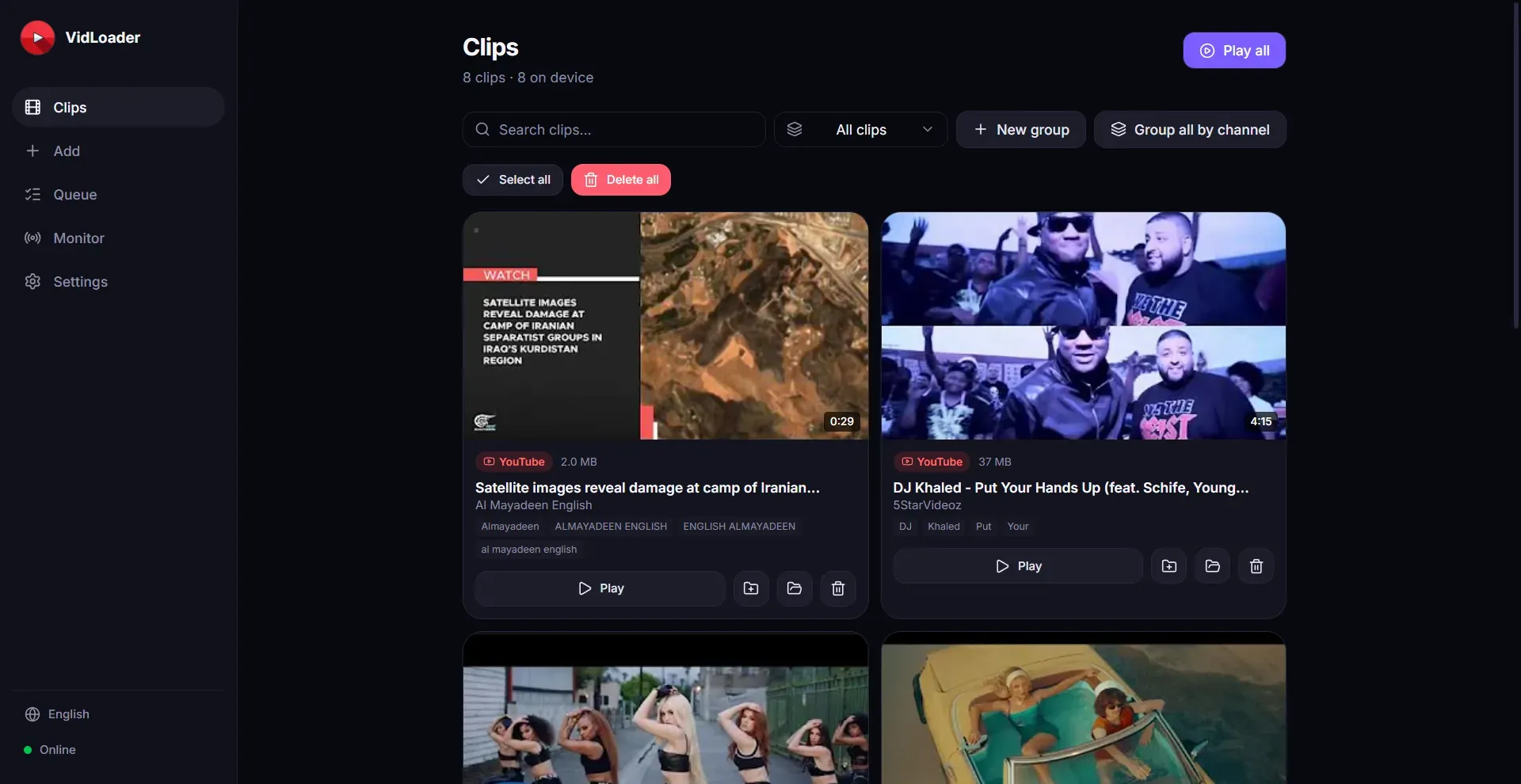
Download and archive video from any website as MP4 or MP3 on Mac, Windows, or Linux with automatic channel monitoring and a browser extension.

Free online QR code generator. Create custom QR codes with AI beautification, dynamic QR codes with scan analytics, batch generation, and a REST API for developers.


CiteTrue is a free AI citation checker that verifies APA and MLA references against academic databases to flag fake or AI-hallucinated sources.
Submit your website to get discovered by thousands of potential customers and boost your SEO.
Get ListedVidLoader is a cross-platform video downloader that enables users to save video and audio from virtually any website or video-sharing platform, including YouTube and TikTok, directly to their Mac, Windows, or Linux computer. The core problem it solves is the need for offline access to online video content, whether for archival, personal use, or content curation. Designed for individual users and professionals alike, VidLoader offers a private, ad-free way to download clips as MP4 (video) or MP3 (audio) without relying on online converter services.
Cross-Platform Desktop App: VidLoader runs natively on Mac, Windows, and Linux, providing a consistent experience across operating systems. Users can download videos without browser limitations or tab management.
Broad Site Support: The application works with any website that hosts video content, including major platforms like YouTube, TikTok, Vimeo, and more. It extracts the highest available quality, supporting resolutions up to 4K where available.
Format Flexibility: Users can choose between MP4 for video or MP3 for audio-only downloads. This makes it easy to create offline video libraries or extract soundtracks, podcasts, or music.
Auto-Monitor Channels and Playlists: VidLoader can automatically monitor specified YouTube channels or playlists, downloading new videos as they are published. This feature is ideal for users who want to keep local archives of creators they follow.
Browser Extension Integration: A companion browser extension allows users to initiate downloads directly from any webpage with a single click. The extension detects embeded videos and sends the URL to the desktop app, streamlining the workflow.
Private and Secure: All processing happens locally on the user's machine; no data is sent to external servers for conversion. This ensures privacy and security for sensitive content.
Users first install the VidLoader desktop application on their Mac, Windows, or Linux computer. Once installed, they can either paste a video URL directly into the app or use the browser extension to send links from any site. The app then analyzes the page, extracts the video stream(s), and presents quality options. After the user selects a format (MP4 or MP3) and quality, the download begins. For automatic archiving, users can add YouTube channels or playlists to a watch list, and VidLoader periodically checks for new content and downloads it without manual intervention.
VidLoader is built for individual content consumers, researchers, and professionals who need reliable offline access to online videos. It suits content creators who want to backup their own work, journalists archiving public footage, educators curating resources, or anyone who frequently downloads videos from multiple sites. The auto-monitor feature is especially useful for users who follow many YouTube channels and want a local mirror of new uploads. The app is designed for tech-savvy individuals comfortable installing desktop software, but its intuitive interface makes it accessible to non-technical users as well.
VidLoader delivers a straightforward, powerful solution for downloading video and audio from any website. Its combination of broad site support, automatic channel monitoring, and cross-platform availability makes it a versatile tool for offline media management.