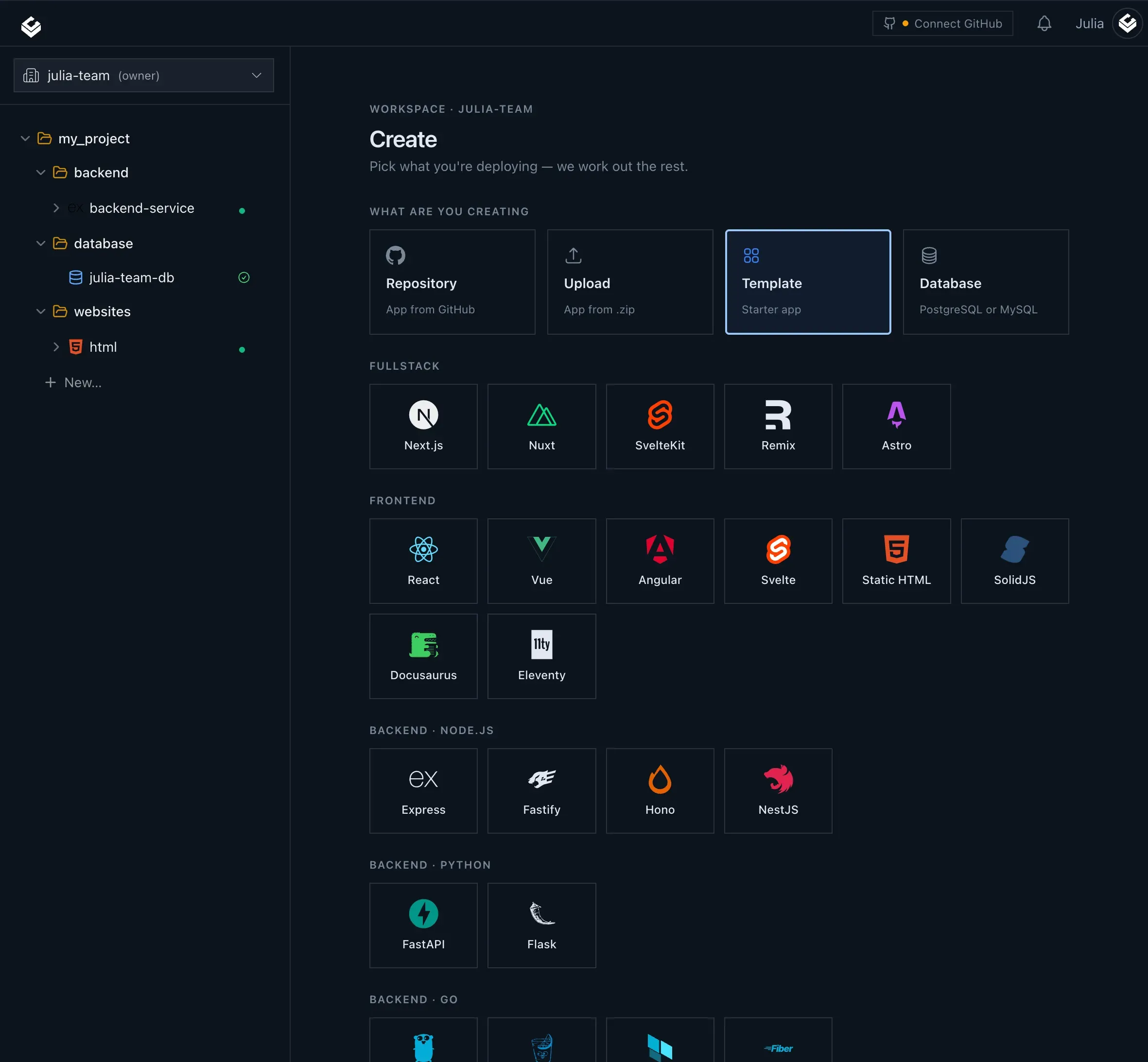
Light Cloud deploys web apps from GitHub to Cloud Run and CDN, with managed Postgres, branch previews, and AI-assisted deployment.
Submit your website to get discovered by thousands of potential customers and boost your SEO.
Get ListedLight Cloud is a developer-focused deployment platform that reimagines web hosting by tying directly to GitHub. Instead of juggling separate services for static sites, backend containers, and databases, Light Cloud brings all three together into a unified workflow. The core proposition is simple: developers push code to a GitHub repository, and Light Cloud automatically builds and deploys it to a live URL, whether the app is a static frontend, a containerized API, or a full stack project with a managed Postgres database. The platform positions itself as a modern alternative to Vercel, Netlify, and traditional cloud hosting, with a strong emphasis on reducing operational overhead and making deployment accessible to developers of all skill levels.
The service is built for developers, small teams, and early-stage startups who want to move fast without managing infrastructure. It solves the problem of fragmented tooling by offering static sites, containers, and databases in one place, all provisioned from a single project. Light Cloud also embraces the rise of AI-assisted development by providing an MCP server for Claude and a VS Code extension for GitHub Copilot, letting developers deploy directly from chat or their editor. For teams that value branch-based previews and automatic rollback, the platform provides a preview URL for every branch and pull request, removing the friction of manual test environments.
Market positioning is clearly aimed at developers who are comfortable with Git but want to avoid cloud complexity. By leveraging Google Cloud Run for containers and a global CDN for static assets, Light Cloud offers serious infrastructure under the hood while keeping the developer experience simple. The company also runs a Labs section with open-source tools like ICE, a visual cloud editor, demonstrating a commitment to creative infrastructure tools. Overall, Light Cloud is an attractive option for anyone looking to ship web apps faster with less juggling of separate cloud services.
Deploy from GitHub The entire platform revolves around GitHub integration. After connecting a repository, every push automatically triggers a build and deployment. The service detects the project type, whether it is a static site or a container, and routes it to the appropriate target. This eliminates the need for manual CI/CD configuration and lets developers focus on writing code rather than managing pipelines.
Static Sites on a Global CDN For frontend projects, Light Cloud deploys build output to a content delivery network, ensuring fast load times across the globe. Static assets are served from edge locations, which reduces latency and improves performance. The platform automatically handles the build process, so frameworks like Next.js, React, or plain HTML work out of the box.
Containers on Cloud Run Backend services that require a server runtime are packaged as containers and deployed to Cloud Run. This serverless container service automatically scales based on traffic, and importantly, scales to zero when idle. This means containers stop billing when no one is hitting them, providing significant cost savings for low-traffic services. The platform manages the container lifecycle, from build to deployment to automatic scaling.
Managed Postgres Light Cloud includes managed Postgres databases as a first-class feature. Users can provision a database directly from the project dashboard, selecting a tier, region, and storage size. Credentials are encrypted and automatically wired to the application, making it easy to connect a backend service to its data store without manually managing secrets. This integration simplifies full-stack development and reduces the risk of database misconfiguration.
Branch Previews Every branch and pull request gets its own unique URL, built on push and removed when the branch is deleted. This enables teams to preview changes in a live environment before merging, without affecting production. Previews are isolated from production and scale to zero when not in use, meaning they cost nothing for idle environments. This is a powerful feature for code review and collaborative development.
AI Deployment Tools One of the most distinctive features is the integration with AI assistants. The Light Cloud MCP server lets Claude create apps, deploy, and read logs directly from conversation. The VS Code extension adds a @lightcloud mention to GitHub Copilot, with slash commands like /deploy, /status, and /plan. This allows developers to trigger deployments, check status, and get deployment plans without leaving their editor or chat interface. Framework detection and .env parsing are handled automatically, making AI-assisted deployment surprisingly seamless.
Integrated Observability Logs and metrics are built into the platform, so developers can watch build streams and monitor running services in the same dashboard. This eliminates the need for separate observability tools for basic monitoring. Users can inspect commit history, build times, and logs for each deployment, giving complete transparency into the deployment lifecycle. The observability features are designed to be simple but sufficient for most teams, avoiding the complexity of dedicated monitoring stacks.
The typical user journey begins by creating an account on Light Cloud and connecting a GitHub repository. The platform asks for permission to access repositories, and once connected, the user selects a repository to deploy. Light Cloud then performs framework detection, identifying what kind of project it is, and suggests a configuration. If the user provides a Dockerfile or the project contains static build assets, the platform knows exactly how to handle it.
For a static site, Light Cloud will run the build command (such as npm run build) and upload the resulting files to the global CDN. For a containerized service, the platform builds a Docker image and deploys it to Cloud Run. The user can also provision a managed Postgres database from the project dashboard, and Light Cloud automatically injects the database credentials into the application environment.
Once the initial deployment is done, every subsequent push to the repository triggers a new build and deployment. The platform shows a dashboard with deployment history, including the commit hash, author, build time, and logs. For branch previews, a user can create a new branch, push it, and Light Cloud will generate a unique URL for that branch. When the branch is deleted, the preview environment is removed automatically.
To deploy with AI, a developer can either use the MCP server in Claude or the GitHub Copilot extension in VS Code. With Copilot, typing @lightcloud /deploy in a comment will trigger a deployment. The AI can also provide a deployment plan with /plan, showing what steps will be taken before deployment. This integration is designed for developers who prefer keyboard-driven workflows or want to avoid switching between browser and editor.
The entire workflow is designed to be as frictionless as possible. There is no need to configure YAML files or manage cloud access keys. Light Cloud handles the infrastructure details, and the developer simply interacts with Git and the Light Cloud dashboard.
Frontend Developer Shipping a Personal Website A developer wants a fast, reliable host for a personal blog or portfolio built with a static site generator like Astro or Eleventy. With Light Cloud, they connect the repository, push, and get a live URL immediately. The global CDN ensures fast loading, and the free plan allows them to experiment without cost. They can also set up a custom domain and get HTTPS automatically.
Startup Building a Full-Stack MVPs An early-stage startup needs to launch a product with a React frontend, a Node.js API, and a Postgres database. Light Cloud allows them to deploy the frontend to the CDN and the API container to Cloud Run, with a managed Postgres database in the same project. The branch preview feature lets the team test features in isolated environments before going to production, and the scale-to-zero behavior keeps costs low during the initial launch phase.
Agency Running Client Projects A digital agency manages multiple websites for clients. With Light Cloud, they can create a separate project for each client, connect the client's GitHub repository, and deploy with confidence. The per-branch previews make it easy to show clients changes before launching. The simple pricing and free plan are attractive for agencies that need predictable costs across many small projects.
Developer Using AI-Powered Workflows
A developer is accustomed to using GitHub Copilot for coding and wants to extend automation to deployment. They install the VS Code extension and use @lightcloud /deploy to ship changes directly from the editor. The MCP server integration with Claude lets them ask Claude to create a new app, deploy it, or inspect logs using natural language. This workflow saves time and keeps the developer in their flow state.
Team Needing Reliable Preview Environments A development team wants to show every pull request in a live environment to ensure product managers and designers can interact with changes before merging. Light Cloud automatically generates a preview URL for each branch, eliminating the need for separate staging servers. The previews are ephemeral, only existing as long as the branch, which keeps the workflow clean and reduces infrastructure clutter.
Light Cloud offers a Free plan, which is a key entry point for developers. While the exact limits of the free tier are not detailed on the landing page, the site encourages users to sign up and start with the Free plan. The pricing page, available at Light Cloud pricing, provides full details on the tiers and what they include. The structure likely follows a usage-based model, which is common for cloud deployment platforms, with costs scaling based on compute time, database size, and bandwidth.
When compared to alternatives like Vercel, Netlify, or Render, Light Cloud's value proposition is the integrated database and container support in a single platform. Vercel focuses primarily on frontend, while Render offers similar full-stack capabilities. Light Cloud's AI deployment tools are a differentiator, as they embrace the emerging trend of AI-assisted development. The scale-to-zero feature also ensures that users only pay for active compute, which is a significant cost saving for low-traffic applications.
The free plan makes it easy to evaluate the platform without upfront commitment, and the ability to scale resources as a project grows makes it a cost-effective choice for startups. The pricing is competitive with other PaaS offerings, though users should carefully monitor usage to avoid unexpected bills, as is typical with serverless architectures. For teams that value simplicity and out-of-the-box integrations, Light Cloud offers a strong balance of features and cost.
Light Cloud is a compelling platform for developers who want to deploy modern web applications with minimal friction. Its tight GitHub integration, support for static sites, containers, and managed Postgres, and innovative AI deployment tools make it a powerful choice for full-stack development. The branch previews and scale-to-zero features address common pain points in development workflow and cost management. The integrated observability is a nice bonus that removes the need for extra monitoring tools for basic use.
The main areas for improvement are transparency around pricing and potential vendor lock-in. Details on free tier limits and usage pricing are tucked away on the pricing page, and the tight integration with Google Cloud Run may make it difficult to migrate to other infrastructure providers. Additionally, teams with complex observability or audit needs may find the built-in logging insufficient, requiring external tools.
Overall, Light Cloud is best suited for small teams, startups, and developers who value speed and simplicity over granular control. Those who need advanced infrastructure customization or prefer to manage their own cloud account may find it limiting, but for the majority of web app deployment scenarios, Light Cloud is a robust and forward-thinking solution. The platform's embrace of AI deployment tools places it at the forefront of a new era in developer tooling.