Lizard is an AI-native deployment platform for coding agents, with managed Postgres, Redis, S3, and agent-readable logs.
Submit your website to get discovered by thousands of potential customers and boost your SEO.
Get ListedLizard is an AI-native cloud deployment platform built specifically for coding agents. It solves the problem of managing cloud infrastructure while working with AI assistants like Claude Code, Codex, and Cursor. Developers no longer need to manually create virtual machines, set up databases, or configure CI/CD pipelines. Lizard does that in one command, and it provides a unified dashboard for monitoring everything. The platform is positioned as an alternative to Railway, Render, and Fly.io, but with a focus on the agent loop. Other platforms have added basic AI support, but Lizard was designed from the ground up for machines to interact with it. The site's tagline, "AI-native deployment platform for coding agents," clearly communicates this niche.
The core value proposition is speed and simplicity. A user can push code to a repository, and Lizard automatically builds, deploys, and makes the app live. It also provisions managed Postgres, Redis, and object storage when needed. This reduces the time from code to production from days to minutes. The free tier includes $5 of credit for the first month, which allows developers to experiment without financial commitment. The platform includes a Studio interface, a CLI, and sandboxes for running code in isolated environments. All these pieces are interconnected, and the data flows seamlessly between them. For a deeper look at the team and their philosophy, the Lizard blog contains posts about deployment and AI agent workflows.
Agent-first CLI
The Lizard CLI is a core piece of the platform. It is installed globally via npm and runs on any machine. The CLI outputs machine-readable schema for every command, deploy event, and log line. This means a coding agent can parse the output and take action. For example, if a build fails, the agent can read the error message, modify the code, and redeploy without human help. The CLI is visually shown in a terminal with Claude Code integration, indicating that it works directly inside the agent's environment.
Managed Postgres, Redis, and S3
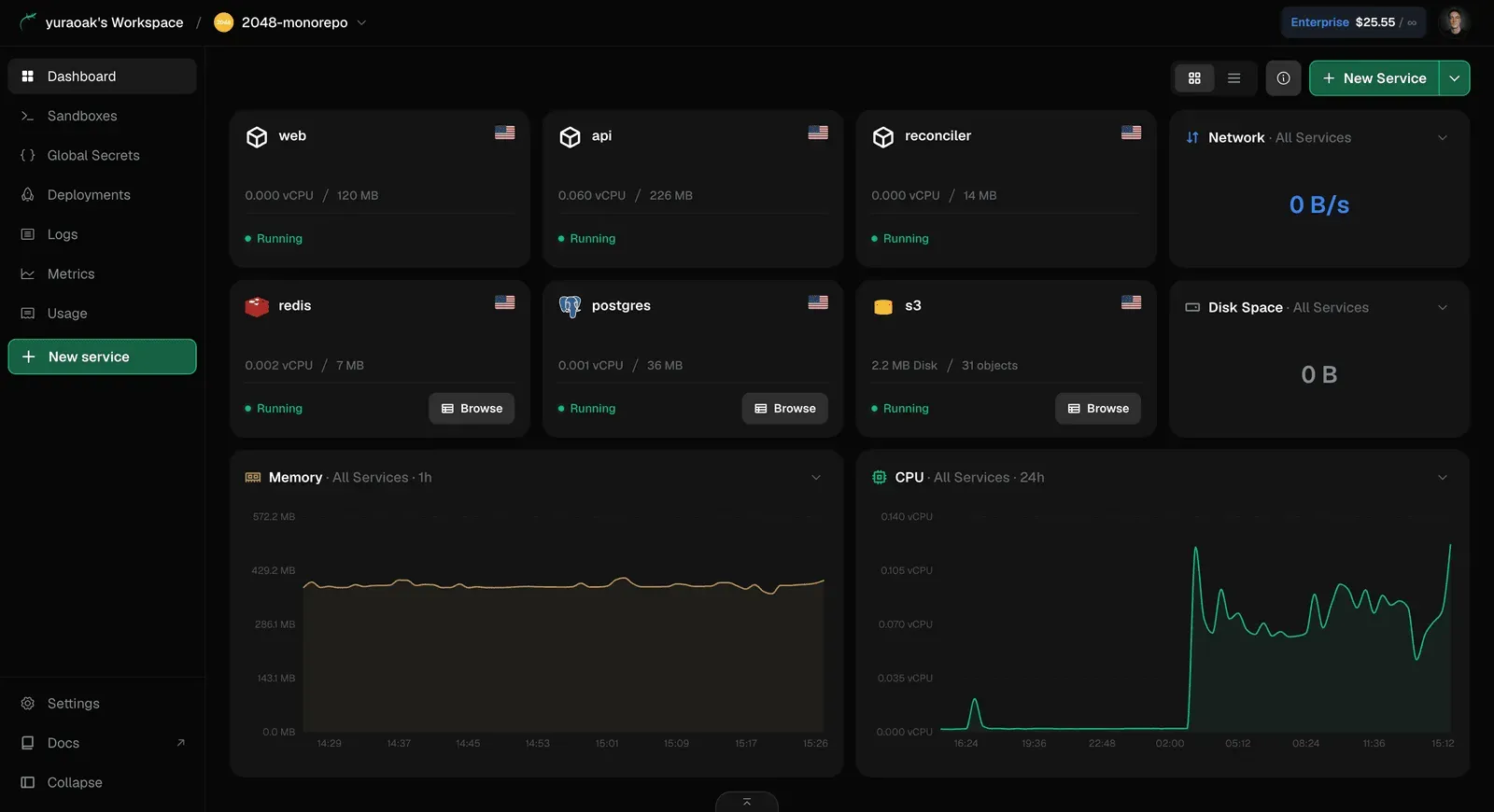
Lizard provides fully managed database and storage services that can be spun up in one command. The dashboard shows instances for Redis, Postgres, and S3 running alongside applications. Each database displays resource usage, such as vCPU and memory, and has a status indicator. This eliminates the need to use separate cloud services and simplifies security because connections are automatically configured for the deployed app.
Git push to deploy
The deployment process is as simple as pushing to the main branch. Lizard detects the project stack, runs a build using lizardpack, and deploys the code. The interface shows deployment history with status, duration, and branch names. This is a familiar workflow for developers and works exactly as expected.
Live logs and request metrics
Every service includes live logs and metrics. The dashboard displays a log table with timestamps, service names, and messages, and it also shows CPU usage over time. Logs can be streamed in the web UI or from the command line. This makes debugging straightforward, and the agent-readable format allows AI to analyze patterns automatically. The Lizard CLI documentation explains how to stream logs from the terminal.
Per-second billing
Instead of reserved instances, Lizard bills on measured CPU, memory, and egress. Idle apps cost almost nothing because the vCPU is parked at near-zero and memory pages are evicted. The platform includes an interactive cost comparison tool that shows how a typical app costs $32.57 per month on Lizard versus over $55 on AWS. The pricing page provides details on the specific rates for each tier.
Secure isolated containers
Each deployment runs in its own isolated pod, providing security and reliability. The interface shows service instances with region flags, replica counts, and resource allocation. This container-first approach is similar to Kubernetes, but hidden behind a user-friendly abstraction.
Lizardpack build planner
Lizardpack reads the repository and determines the language, framework, and package manager. It supports Node, Python, Go, Rust, Ruby, PHP, Java, static sites, and more. It then generates a multi-stage Dockerfile that can be reviewed and modified. This is more transparent than other build systems, which often hide the build process behind proprietary plans.
Code interpreter sandboxes
Lizard offers sandboxes that return typed results instead of raw stdout. This is important for AI agents that need structured data for evaluation loops. The sandbox feature is highlighted as a differentiator, as competitors only provide partial support. Developers working on agent evaluation can use the sandbox feature described on the sandboxes page.
Getting started with Lizard is straightforward. A developer visits the site, clicks "Try for free," and creates an account. No credit card is required for the free tier. Then, the CLI is installed with npm i -g @lizard-build/cli. The developer authenticates and runs lizard up from the project directory. Lizardpack analyzes the code and creates a Dockerfile. The build starts, and within minutes the app is live on a Lizard-managed domain.
If the project needs a database, the user can run lizard postgres create or use the dashboard to provision one. The connection string is automatically injected into the deployed app as an environment variable. The same applies to Redis and S3. This integration removes the most tedious part of cloud development.
For AI-driven workflows, the process is even more conversational. A developer tells Claude Code to deploy the app using Lizard. The agent downloads the CLI, runs the commands, and reads the output. If errors occur, the agent sees the structured logs and can iterate. This creates a loop where the AI is responsible for fixing deployment issues, which is a significant time saver.
The dashboard provides a bird's-eye view of all services. It shows active deployments, memory usage, cost estimates, and log streams. Users can also scale replicas, trigger rollbacks, and inspect metrics. The Studio interface adds visual management for those who prefer a GUI over the command line. The entire platform is designed to be used by both humans and machines, with the CLI and API serving as equal citizens.
Hobbyist building a side project
A developer experimenting with a new idea can deploy a full-stack app with Lizard's free credit. If the project fails to gain traction, the cost is near zero due to per-second billing. If it succeeds, scaling up is just a command away.
AI agent developer testing tool interactions
Someone building a custom bot or agent can use Lizard sandboxes to run tests in an isolated, reproducible environment. The typed results make it easy to verify the agent's behavior.
Startup wanting zero-ops infrastructure
A small team can provision the entire backend stack (app, Postgres, Redis, S3) in minutes using the CLI. They avoid hiring a DevOps engineer in the early stages, and the per-second billing keeps costs predictable.
Agency managing multiple client deployments
An agency can deploy and monitor several client apps from a single Lizard account, using the dashboard to switch between projects. The agent-friendly CLI allows team members to automate routine tasks.
Enterprise with strict compliance needs
For organizations that require SOC 2 or HIPAA, Lizard's Enterprise plan provides the necessary certifications along with SSO/SAML and audit logs. This tier is designed to meet corporate compliance standards.
Lizard's pricing page outlines several tiers. The Free plan provides $5 of credit for the first month, no credit card required. The Hobby plan costs $5 per month and is described as sufficient for a typical side project. Pro and Enterprise plans are aimed at teams with more demanding workloads and include features like collaboration, advanced metrics, and compliance. The pricing is transparent, and the per-second billing model ensures users pay only for what they consume.
Compared to competitors, Lizard offers an attractive value proposition. A side-by-side comparison on the site shows Lizard at $32.57 per month for an app and database, while AWS costs $55.66 for the same resources. Render and Fly.io are even more expensive in the comparison. The reason is that traditional clouds bill for idle time, whereas Lizard only charges for active usage. This makes it an excellent choice for developers who want to keep infrastructure costs low without sacrificing performance.
Lizard is a well-designed platform that understands the needs of modern AI-first developers. Its agent readability, managed services, and cost model are genuine differentiators. The experience is smooth, and the CLI is a pleasure to use. That said, the platform is relatively new, and some advanced features may still be evolving. Teams that rely heavily on specific AWS services or require a vast ecosystem might find the platform limiting. However, for solo developers and startups looking to ship quickly, Lizard is a compelling choice that deserves attention.